 LabControl
LabControl
Documentation (english) - v 1.0
Setup information - readme first
Server Operating system: The recommended operating system to run LabControl server software and control your lab is WindowsXp (LabControl is compatible with XPSP2). However, if your lab consists of windows9x computers, then you can setup LabControl server on win98/me operating systems.
System requirements (Server):
Windows 98/Me/2000/XP/2003 operating systems
1000 Mhz or more processor, 128MB or more RAM, 800x600 or more screen resolution, 20MB empty disk space.
System requirements (Client) :
Windows 95/98/Me/2000/XP/2003 operating systems600 Mhz or more processor, 64MB or more RAM, 10MB empty disk space.
Note : Client may run on lower configurations (not tested).
Server setup :
To setup LabControl server software, run LabServerSetup.exe on the computer you want to control your lab from.
Server setup is pretty straightforward. After setup finished, you'll notice LabControl icon on your desktop. You can start LabControl server by clicking on it's icon.
Before starting client setups, please note the name of the admin computer (the computer you have just setup LabControl server software). This is the name of the computer on windows network and will be asked during client setup. This name is displayed on LabControl screen as "Server Hostname= ... ".
Note : Don't setup server and client software on the same computer, other than testing purposes.
Client Setup :
To setup LabControl client, run LabClientSetup.exe on a computer you want to control in your lab. This will start LabControl client setup.
Client setup will ask you server information during setup:
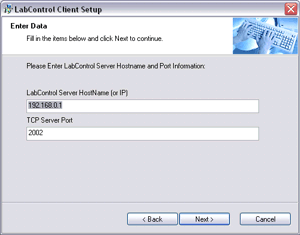
You must enter the "name of the admin computer" to the LabControl Server HostName field. This is the name of the computer running LabControl server on your network. You don't need to change TCP server port number unless this default port (2002) is already used on your network. After entering server name, click next to continue.
Note : You can enter the IP of the server into the server hostname field if you want. But using computer names instead of IPs is recommended.
Client setup will provide you with some options:
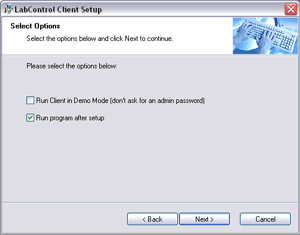
Do not change anything here and just click next. You can change this options after setup if you want.
LabControl client setup will finish and the client will start to run as a tray icon.
What to do next?
Please continue with the "First Use" link..
Recommendation : It is recommended to setup client software on one or two computers first. You can setup client software on other computers later.